
Image carousel module

Module name - Carousel

Module type - Multiple (you can create multiple copies of the module)

Module operation - Module shows banners or images carousel



Before you add a module you need to create a banner set that this module will show
Steeps to do:
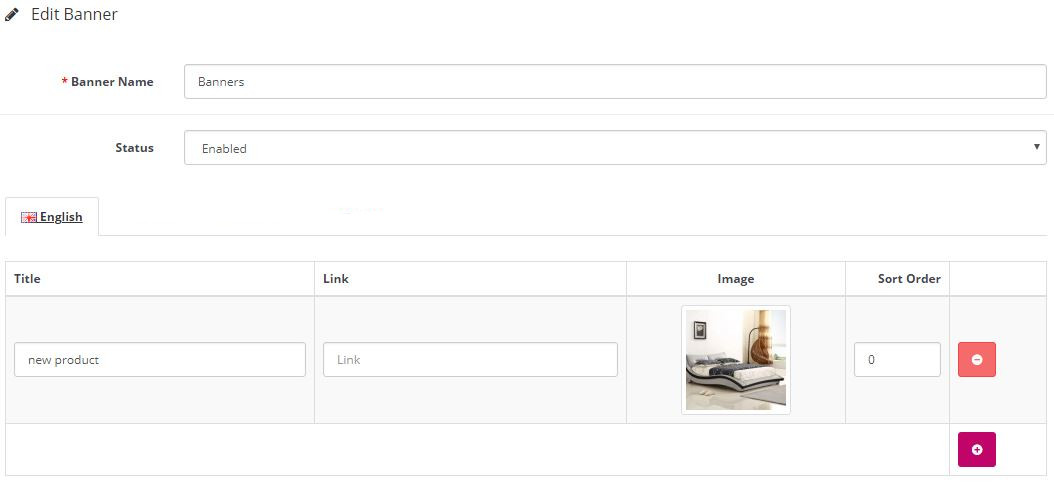
  1. Create banners (images) set
  2. Create banner module
  3. Add module to store pages


How to create or edit images sets

  1. From side menu go to Design - Banners
  2. If you want to edit exist banner set - press "pencil button", if you want to add a new banner set - press "+ button"
  3. Banner set fields:
    1. Banner Name - set name
    2. Status - Enable or Disable
    3. Images lines
  4. Press "+ button" to add a new image
  5. Image title - type image name or press 3 spaces to leave blank
  6. Image Link - you can add link or leave blank
  7. Image - press on Image and choose or upload an image from the file manager 
  8. Order - you can set a custom order
  9. Press Save button on top right corner to save 


Now you can add a carousel module

Module fields

  1. Module Name - name
  2. Banner - choose banner set to show
  3. Width - images width
  4. Height - imager height
  5. Status - Enable or Disable module